SetMate workflow

Follow-up automation that keeps every distressed-property lead warm

Distressed-property follow-up fails when the next task sits in a notebook, an owner replies in a different thread, or an auction-relative message no longer matches the current date. SetMate puts the schedule on the lead with conversations, contact rules, property context, and pipeline stage. Automation handles planned touches while reps see what was sent, what is due, and when a reply means the sequence should stop.

An illustrative working example

Review the person, message, and channel before activation

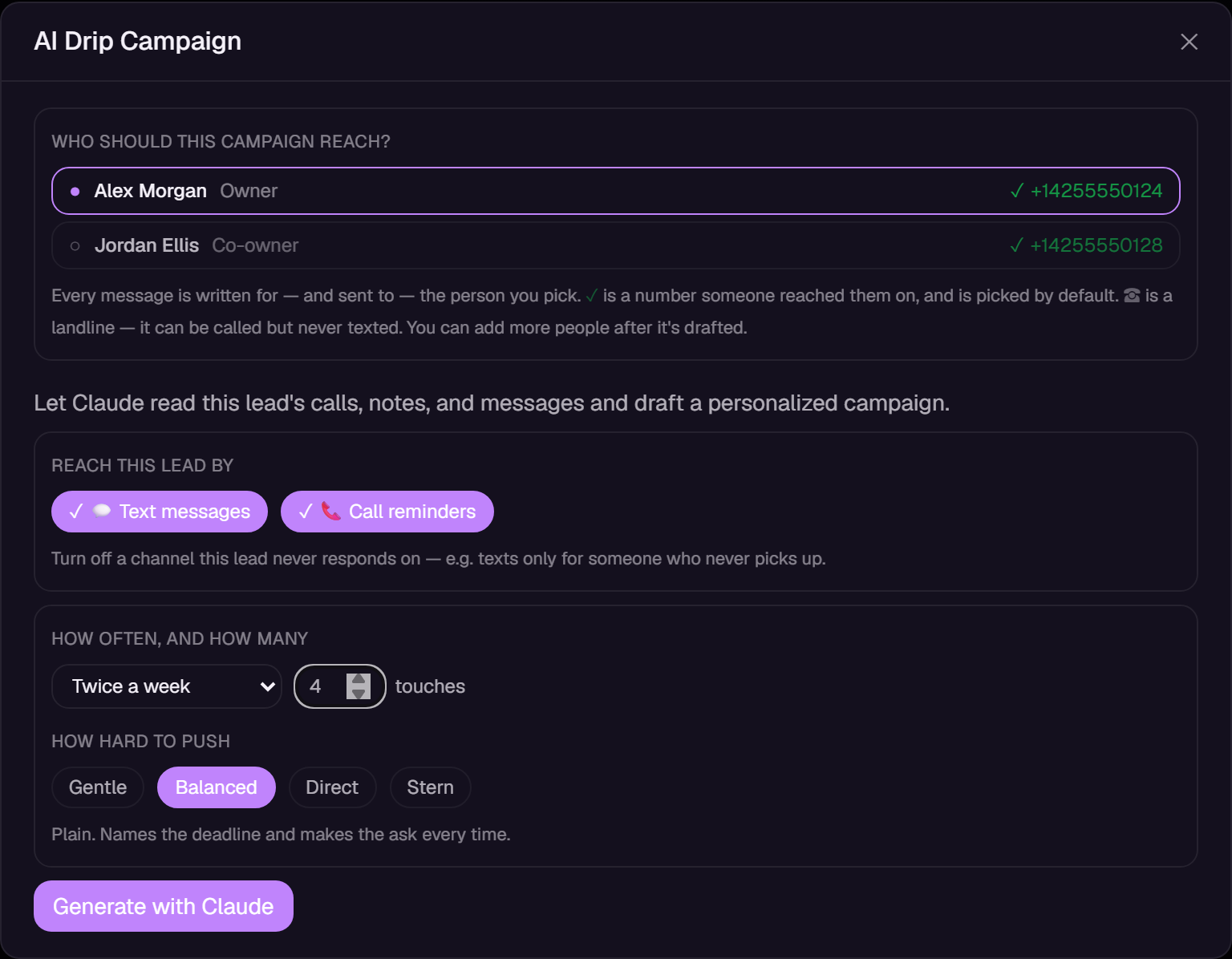
A fictional owner asks to reconnect next week. The rep records that context, reviews the proposed follow-up, checks the intended recipient and timing, and activates only an appropriate plan. A reply gives the team a reason to review the next step.

Actual SetMate personalized-drip review screen using fictional lead data
Actual SetMate screen · fictional sample data. Illustrative workflow, not a customer result. Captured September 2026; the current interface may vary.
  1. Choose recipients and review the proposed wording, cadence, and schedule.
  2. Check channel readiness and restrictions; a draft is not a delivered message.
  3. Review replies and delivery status, then pause, change, or stop the plan when needed.

Campaign sequences and personalized AI drips are distinct tools. Available AI-drip channels depend on workspace enablement and recipient readiness. Email needs a ready sending account and required business details; postal mail has separate setup and approval controls. Call tasks remind a person to call.

The working process

How SetMate does it

1

Choose how a lead enters follow-up

Enroll an eligible contact manually or connect a sequence to a pipeline stage so the right follow-up begins when a lead moves. SetMate checks for an active enrollment to avoid starting the same sequence twice. Contacts without a usable destination, contacts marked do not contact, and opted-out recipients should not be treated as normal sends. The acquisitions rep still decides whether a particular owner and situation belong in automated outreach.

2

Set timing around enrollment or the auction

Build a schedule relative to the enrollment date or, for a foreclosure workflow, relative to a usable sale date. Auction-relative steps are placed before the recorded deadline, and past steps are skipped when a lead enters late. Configured send windows, days of the week, and time zone keep planned delivery inside the team's chosen hours. If the sale date is missing, passed, or unreliable, use a different schedule until the record is verified.

3

Coordinate messages and human tasks

Use campaign sequences for configured messaging channels and personalized AI drips for lead-specific follow-up. These are distinct tools. AI-drip channel availability depends on workspace enablement and recipient readiness; email and postal mail have additional setup requirements. Human call tasks remind a rep to make contact. Review recipients, message wording, cadence, and schedule before activation, then check the next planned action and delivery status on the lead.

4

Keep responses and restrictions with the lead

Incoming and outgoing SMS, email, calls, notes, and activity remain visible on the shared contact record. A sequence can be configured to stop when the owner replies, and reps can pause or stop follow-up when the conversation changes. Opt-outs and do-not-contact status are part of the sending decision, not a separate spreadsheet. Blocked or failed touches remain visible so the team can understand why a scheduled step did not become a completed conversation.

5

Turn a warm response into the next action

When the owner engages, the rep can add a note, mark a quality conversation, create a task, update lead temperature or pipeline stage, and book an appointment from the same record. Managers can review texts, calls, unique attempts, unique contacts, quality conversations, and appointments by date and user. Those reports show how the team's own follow-up is progressing; they do not assume that a sent message equals a contact or guarantee a conversion.

What you see in SetMate

  • Sequence builder: Named follow-up steps, channel, timing, sale-date or enrollment anchor, sending days, hours, and time zone.

  • Enrollment controls: Manual enrollment and eligible pipeline-stage automation with duplicate-enrollment protection.

  • Lead campaign card: Active, paused, stopped, or finished state, steps completed, and the next scheduled text, email, or call task.

  • Conversation tabs: SMS, email, calls, notes, and activity connected to the owner and property.

  • Contact controls: Opt-out, do-not-contact, recipient details, follow-up date, assignment, and pipeline status.

  • Team reporting: Attempts, contacts, quality conversations, appointments, and calculated conversion rates for a selected period.

Who this is for

This workflow is for real estate wholesalers and acquisitions teams that need consistent follow-up after the first attempt, especially when foreclosure dates make timing relevant. It supports teams mixing automated messages with rep-owned calls, tasks, field visits, and appointments rather than treating a drip campaign as the entire acquisition process.

Every team remains responsible for consent, opt-out handling, message content, sending rules, and other laws that apply to its outreach. SetMate provides workflow controls and history, but it does not turn an ineligible contact into an eligible one or replace legal advice about a campaign.

Frequently asked questions

Can SetMate send an SMS drip for wholesalers?

Yes. SMS campaign sequences support timed follow-up. Personalized AI drips provide a separate lead-specific plan with available channels and human call tasks. Channel enablement, recipient readiness, and sending restrictions apply; review the planned schedule before activation.

Can follow-up use the auction date?

Yes, when the lead has a usable future sale date. SetMate schedules the remaining auction-relative steps and skips planned times already in the past. Your team should verify material auction dates before relying on them.

What happens when an owner replies or opts out?

Replies appear in the shared communication history, and a sequence can be configured to stop on reply. Opt-out and do-not-contact status are checked so restricted recipients are not handled like ordinary scheduled sends.

Can reps pause or edit the follow-up?

The campaign can be reviewed and its status managed from the lead. Reps can pause or stop follow-up when the owner's situation changes, then create the appropriate task, note, stage update, or appointment.

Are follow-up automation prices published?

No listed prices are published. SetMate plans are tailored to lead volume, market coverage, channels, and team workflow. Schedule a consultation to discuss the follow-up setup that fits your acquisitions operation.

See this workflow with your acquisitions process

Bring one of the follow-up schedules your team uses today. A consultation can show how enrollment, auction-relative timing, messages, call tasks, replies, opt-outs, appointments, and reporting stay connected in SetMate.

Request a private demo