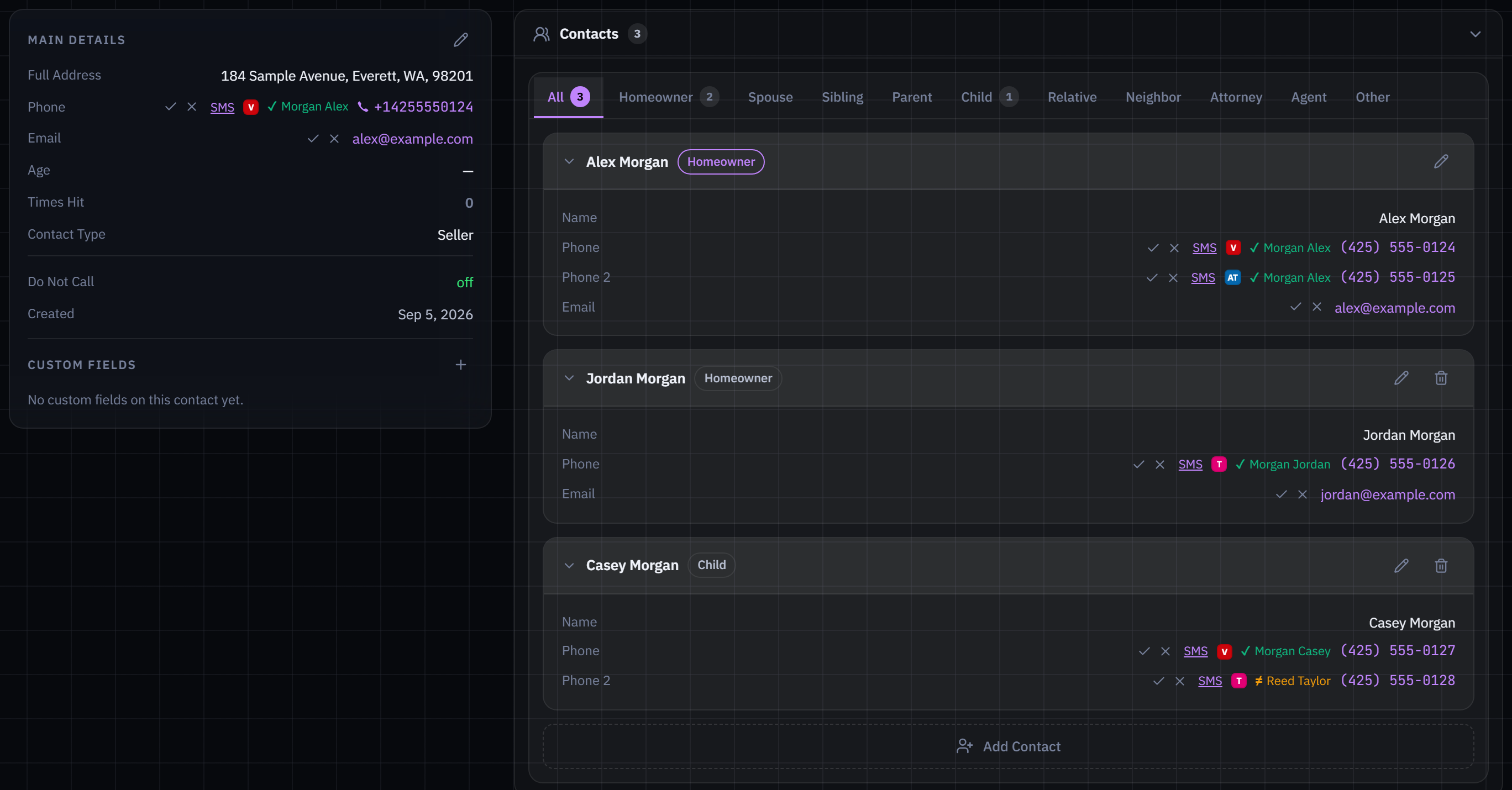
Keep owners, related contacts and their different numbers together. See available caller-name, carrier and line-type context on imported and skip-traced numbers before you call.
Multiple contacts per address · Available CNAM and carrier context
Explore an interactive example of the SetMate workflow. Change the details and see how the same deal carries through.Illustrative preview with fictional data. Full product walkthroughs are shared privately.
Discover
Make every mile count.
Build a drive route around the properties you want to reach. Spot another opportunity? Driving for Dollars turns an address, a photo and your notes into a lead your team can work.
Route filters, saved lists and auction urgency
Door-knock outcomes, notes and next steps
Connect
One address. More ways to reach the right person.
Work the owner, co-owner and other contacts connected to a property. Call their different numbers with available CNAM caller-name, carrier and line-type information alongside each number.
Multiple people and phone numbers per property
Phone intelligence on imported and skip-traced numbers
Evaluate
Walk in prepared. Walk out informed.
Capture photos, video and the seller conversation in the field. Bring the visit together with AI analysis, comps, repair assumptions and offer scenarios.
Camera and recording tools on the property
Property analysis connected to the conversation
Agree
Your contract. Prepared with AI. Signed your way.
Import your PDF and let AI help identify signature, initial and date fields and who completes them. Review the suggestions, fill from CRM data and keep the agreement moving.
Email a signing link or copy it to text
Sign together in person, right from the CRM
Market
Your next buyer starts here.
Carry the opportunity into disposition. Match buyers, prepare marketing materials and reach your list with built-in email blasts and sequences. Keep the property and the buyer conversation connected.
Buyer relationships and deal marketing
A connected path from acquisition to closing
INTERACTIVE PRODUCT PREVIEW
Deal workspace
Fictional sample data
184 Maple AvenueAlex Morgan · 3 bd / 2 ba
Acquisition
LEAD DISCOVERY
Start with a signal.
3 of 3 sample properties shown
Make every mile count.
Build a drive route around the properties you want to reach. Spot another opportunity? Driving for Dollars turns an address, a photo and your notes into a lead your team can work.
Your sample changes stay with the deal as you switch stages.
KEEP THE RELATIONSHIP MOVING
Follow-up with a memory.
A seller’s situation changes. Your follow-up should reflect the conversation, the property and the people involved.
PERSONALIZED SMS + CALL REMINDERSAI follow-up shaped by the actual conversation
Choose the people connected to the property, your tone and your cadence. SetMate uses the lead’s notes, messages, call transcripts and property context to draft a tailored plan. Refine it in plain language, review the messages and activate when ready. Replies stop that recipient’s sequence; call steps remind your team to make the call.
BUILT-IN EMAIL CAMPAIGNSEmail blasts and sequences, inside your CRM
Connect your mailboxes, send an email blast or build a sequence, and track replies in SetMate’s email workspace. Keep lists, unsubscribe handling and follow-up organized without moving the campaign into a separate email product.
DIRECT-MAIL WORKFLOWA place for mail in your outreach
Select recipients and a template, review the proof and quote, then approve a mailing in your configured direct-mail workspace. Email campaigns and direct mail have their own workflows today; broader AI coordination across these channels is expanding.
Built to keep evolving with your operation.
SetMate is built for rapid feature development around real acquisition work. We move quickly from team feedback to new capabilities, adding and refining AI features as the technology advances.
Your leads. Your team. A more connected way to work.
Replacing your current real estate investor CRM? Bring your lead lists, follow-up, fieldwork, contracts and buyer marketing into the conversation. We’ll review import options and data coverage for your market.
How does calling work when a property has several contacts?
SetMate connects owners and related contacts to the same property, with multiple callable numbers for each person. Imported and skip-traced numbers can include CNAM caller-name information, carrier and line type where available. That context helps you choose a number and understand who you may be reaching; CNAM is not proof of ownership.
Does SetMate include drive routes and Driving for Dollars?
Yes. Build routes using property filters, saved lists, auction timing and re-knock cooldowns, or describe the leads you want in plain language. Share routes with your team and record visit outcomes, notes and follow-up tasks. Driving for Dollars lets you capture an address, photo and notes, connect to an existing property or create a new lead with skip tracing.
Can AI prepare my own contract, and how can the seller sign?
Import your PDF contract and let AI help classify detected fields as signatures, initials, dates or CRM data, with signer roles. Review and confirm the suggestions, then prepare the agreement with CRM information. You can email the signing link, copy it to send by text, or sign together in person. Scanned PDFs may need manual field placement.
What kinds of AI drip campaigns and email outreach can I run?
Personalized AI drips use lead notes, conversations and property context to draft SMS messages and human call reminders for selected contacts, with your tone and cadence. Review and refine before activating. SetMate also has built-in email blasts and sequences, plus a configured direct-mail workspace for reviewing and approving mailings. Email and direct mail use separate workflows today; broader AI coordination across channels is expanding.
What is a distressed property CRM?
A distressed property CRM helps real estate investors and wholesalers organize properties, owners, conversations, and deals where timing or property circumstances matter. SetMate connects lead sources and distress signals with AI-assisted follow-up, field capture, property analysis, agreements, and deal marketing in one workflow.
Is SetMate only for foreclosure leads?
SetMate supports a broader distressed and off-market property workflow. Foreclosure and pre-foreclosure are part of it, alongside probate review, tax distress, recorded liens, code-violation signals, absentee-owner information, and imported leads. Available sources, coverage, and workspace features vary by market and plan.
Does SetMate provide leads as well as the CRM?
Yes. SetMate can combine CRM access with configured lead-data sources, or support a team working its own imported leads. Probate candidates go through review before entering the pipeline, and available code-violation records enrich existing properties. A consultation covers the sources and coverage available for your market.
How does SetMate help during a seller appointment?
Use the SetMate mobile app to capture property photos, video, and in-home audio recordings, or upload files from your browser. AI can turn recorded conversations into summaries, seller context, and next steps. Property analysis brings comps, after-repair value, repair assumptions, and offer scenarios into your evaluation.
Can I send contracts and market deals from SetMate?
Yes. Prepare agreements, collect electronic signatures, and keep signed documents connected to the seller workflow. Then use buyer relationships, property-to-buyer matching, marketing materials, buyer lead-capture pages, and a disposition pipeline to manage the next stage of the deal.
Can SetMate replace my current real estate investor CRM?
SetMate is built to bring distressed lead management, outreach, property research, agreements, and buyer marketing together. In a consultation, map your current tools and workflow to SetMate, review lead-import options, and confirm market coverage and feature availability before planning a switch.
Who is SetMate built for, and how much does it cost?
SetMate is built for real estate wholesalers, investors, and acquisitions teams working distressed and off-market property opportunities. Plans are discussed in a consultation around your team, market coverage, lead sources, and workflow. You can also see how the CRM fits your operation if you already have lead data.
Now picture your next deal.
Let’s look at your market, your leads and the way your team works. We’ll show you where SetMate fits.