SetMate workflow

Door-knock routing built from lead priority, not a map

A short driving route can still be a bad acquisitions route. The closest properties may include a rescinded sale, a listed home, or an address another rep visited yesterday, while an urgent lead has no field attempt. SetMate starts door-knock routing from the working lead list, not from pins alone. The team chooses properties by auction window, grade, status, area, and saved list, then gives the field rep useful context at each stop.

The working process

How SetMate does it

1

Choose candidates from the acquisitions queue

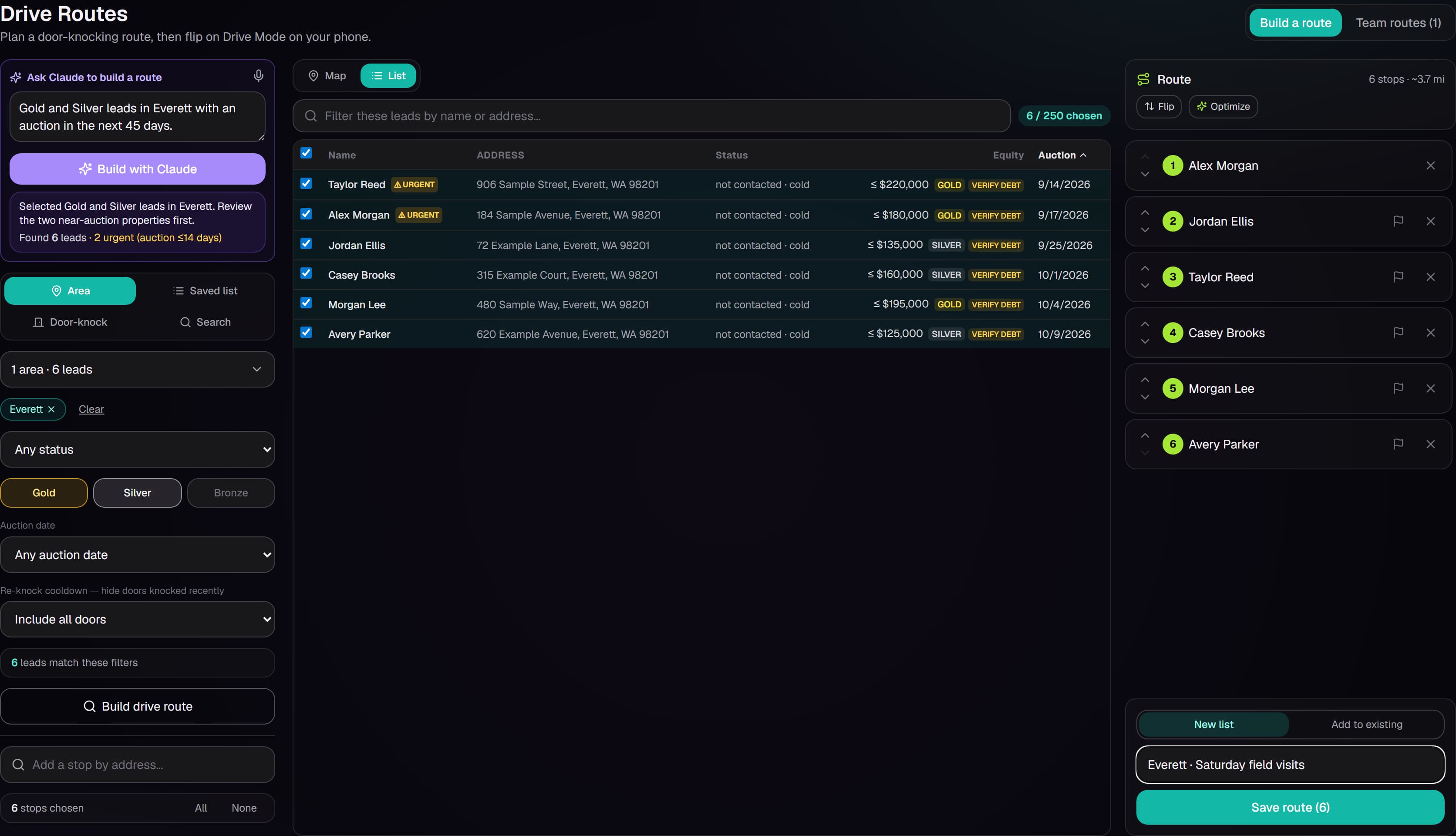
Start with contacts already in SetMate and filter candidates by county or city, lead grade, pipeline status, auction-date window, bookmarked door knocks, or a saved list. Search and sortable lead details help the route builder review the owner, address, auction date, estimated equity, and status before selecting a stop. This keeps the route tied to the same prioritization callers and managers use rather than creating a separate field spreadsheet.

2

Set the route and stop order

Choose the first stop, add the selected properties, and optimize the remaining order. The route can be reviewed in map and list views, and stops can be reordered, removed, or added before the rep leaves. Shared team routes preserve the planned list and ordered stops. Optimization helps organize travel between selected leads; it does not decide which properties deserve a visit, so the acquisitions team controls the candidate set first.

3

Carry lead context to the front door

Each stop can show the address, contact status, temperature, auction date and status, equity, grade, loan evidence, prior knocks, and recent notes. The field view can flag an absentee mailing address, business ownership, active listing, or unconfirmed passed date. A navigation link opens directions while the SetMate record remains available for review.

4

Record what actually happened

From the stop, the rep can record a knock result, add notes, log a call or no-answer attempt, send a text card where appropriate, and schedule follow-up. Outcomes can update the lead's status, pipeline position, temperature, vacancy information, listed state, or do-not-knock condition when the rep learns something material. Notes save back to the property record so callers do not repeat a visit or miss a detail collected in person.

5

Return the field result to the pipeline

A productive visit can become a follow-up task or appointment without re-entering the owner and property information. An unproductive or inappropriate stop can be marked so it does not remain in the same active queue. Managers can review door-knock activity alongside calls, unique properties attempted, quality conversations, and appointments for the selected reporting period. The purpose is a clean handoff between field and phone work, not a claim that every visit creates contact.

What you see in SetMate

  • Route candidates: Selectable leads with owner, property, auction date, equity, pipeline status, and priority context.

  • Route filters: County, city, lead grade, status, auction bucket, bookmarked stops, and saved lead list.

  • Map and stop list: An ordered route that can be optimized, manually reordered, expanded with more leads, or shortened before departure.

  • Mobile stop card: Address, navigation, auction and equity context, recent notes, prior visits, warnings, and available contact details.

  • Knock outcome form: Result, notes, follow-up date, task, vacancy or listing observations, temperature, and do-not-knock state.

  • Shared lead history: The recorded visit appears with calls, messages, notes, tasks, and the next action on the same lead.

Who this is for

This workflow is for real estate investors, foreclosure wholesalers, and acquisitions teams that use door knocking as one channel in a distressed-property process. It supports managers selecting the right stops and field reps who need current lead context, a navigation handoff, and a fast way to report the result.

It is not a substitute for solicitation rules, safe field procedures, or a rep's judgment. SetMate records do-not-contact and do-not-knock context, while each team remains responsible for training and compliant outreach.

Frequently asked questions

Is this the same as driving for dollars software?

It covers the route-planning part of a field acquisition workflow, but starts from leads already prioritized in SetMate. The focus is working known distressed-property records, carrying their context to the stop, and returning the outcome to the CRM.

Can a route use auction dates and lead grades?

Yes. Candidate selection can use auction windows, lead grades, status, county or city, saved lists, and bookmarked door knocks. The team decides the candidate pool before arranging the stop order.

What can a field rep see at a stop?

The stop view can show property and owner context, auction status, equity and loan details, recent notes, prior knocks, warnings, and available contact information. Visibility still depends on what is stored on that lead.

Does the route work offline?

SetMate does not present the route as an offline navigation product. Field reps should plan for a data connection and use the available navigation link for directions. Record important outcomes in SetMate when connectivity is available.

How are door-knock routing plans priced?

No listed prices are published. Plans are tailored to the team's market coverage, lead volume, and workflow. Schedule a consultation to discuss field routing with the rest of your acquisitions process.

See this workflow with your acquisitions process

Bring the filters your manager uses to choose field visits and the details reps need at the door. A consultation can walk through candidate selection, route ordering, the stop view, outcome capture, and the return to follow-up.

Request a private demo