SetMate workflow

Auction deadline tracking that decides who you call today

Auction date tracking breaks down when the date lives in a spreadsheet but the work lives somewhere else. A caller cannot tell whether a sale was postponed, a manager cannot see which urgent leads have gone untouched, and an automated message can arrive after the useful window has passed. SetMate keeps the auction timeline beside the owner, property, conversations, and pipeline status, while making clear that uncertain public-record dates still require verification.

The working process

How SetMate does it

1

Store the date with its foreclosure context

SetMate places the auction date on the property record with the available sale status, source, verification state, and postponement history. The record can distinguish an active date from a rescinded sale, an unverified update, or a passed date without a confirmed outcome. Filing, county, foreclosure-party, and outcome fields stay with the record when available.

2

Build a deadline queue for the current market

Sort contacts by the earliest auction date and filter for the next 30 days, 30 to 90 days, or later deadlines. Narrow the list by county, foreclosure type, lead grade, assigned rep, temperature, equity, listing status, and saved list. Teams can hide rescinded sales or focus on records that need review. The result is not merely a calendar; it is a working call list connected to the facts and activity on each lead.

3

Anchor follow-up to a usable sale date

A follow-up sequence can be scheduled relative to a sale date when the lead has a usable future auction date. SetMate schedules the remaining touches that still make sense and skips timing that is already in the past instead of sending a backlog at once. Sequences can respect configured sending days, hours, and time zone. If the date is missing or unusable, the team can choose an enrollment-based sequence or work the lead manually until the record is corrected.

4

Send urgent properties into calls and field routes

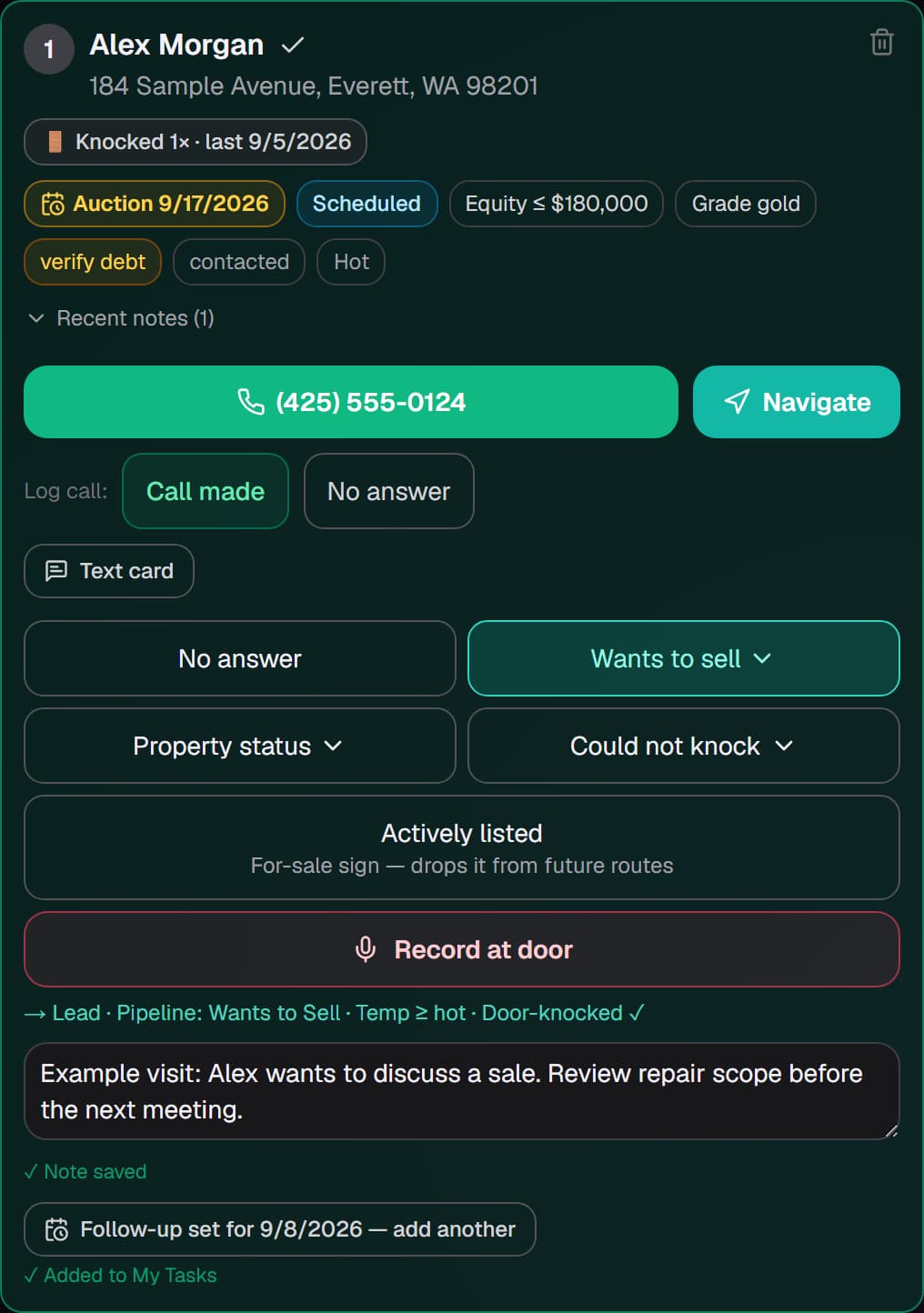
Select records from the deadline view for caller assignment, a saved working list, or a door-knock route. A field rep sees the scheduled date, sale and verification context, equity and loan information, recent notes, prior visits, and warnings such as a listed property or absentee mailing address. That shared context helps the rep decide what to do at the property without pretending the route screen replaces a fresh county or trustee check.

5

Review activity before the window closes

Lead history shows when the property was last worked, what outreach occurred, which tasks are due, and whether an appointment was set. Managers can compare attempts, contacts, quality conversations, and appointments by date and user, or view pipeline reporting against an auction date range. A missed touch stays visible while there is still time to reassign or review the lead.

What you see in SetMate

  • Auction columns: Sale date, status, estimated equity, value, loan balance, county, lead stage, and assigned acquisitions rep.

  • Deadline filters: Next 30 days, 30 to 90 days, 90 days or later, plus options for rescinded and unverified records.

  • Foreclosure detail: Date source, last verification, postponement history, filing information, auction outcome, and sale status when available.

  • Saved lists: Named queues that retain filters, sort order, and selected columns for a market or calling session.

  • Follow-up schedule: Upcoming SMS, email, and call tasks with sequence status and the next planned touch.

  • Activity and reports: Last-worked context on the lead and team-level attempts, contacts, conversations, and appointments by date.

Who this is for

This workflow is for foreclosure wholesalers and acquisitions managers whose priorities change as trustee sale or auction dates approach. It is especially useful when separate callers, researchers, and field representatives need to act from the same deadline view instead of circulating revised spreadsheets.

SetMate is not a county recorder, trustee, court, or legal notice service. It helps the team organize available dates and their source context, but acquisitions staff should verify material deadlines through the appropriate public or professional source before relying on them.

Frequently asked questions

Can SetMate show postponed or rescinded auction dates?

Yes, when that information is present on the record. The property view can carry sale status, prior postponed dates, verification state, source context, and a rescinded or completed outcome rather than showing only one date field.

What happens when an auction date changes?

The updated date and status should be reviewed on the lead, and deadline-based work should be adjusted to match the current record. SetMate preserves context, but your team remains responsible for verifying a material deadline with the appropriate source.

Will a sale-date sequence send old messages after a late import?

SetMate schedules future touches that still fit the configured timing and skips sale-relative steps whose planned time has already passed. The rep can review the schedule before relying on it for an urgent lead.

Can managers divide an auction queue among callers?

Yes. Leads can be filtered by auction window and other criteria, assigned to team members, and saved as working lists. Shared notes and communication history show what happened after assignment.

Are auction tracking plans listed online?

SetMate plans are tailored to market coverage, lead volume, and team workflow. Schedule a consultation to discuss the setup your acquisitions operation needs.

See this workflow with your acquisitions process

Bring a sample of the auction-date questions your team handles every week. A SetMate consultation can show how the deadline queue, lead record, follow-up schedule, field route, and reporting views work together.

Request a private demo